Learn Something New In Your Browser Side Panel
Transform your browser into a learning machine. Master vocabulary and concepts with science-backed spaced repetition — no extra apps, no extra time.
5.0 Rating
on Chrome Store
Privacy First
Local Storage
Secure
No Data Collection
The Problem
Learning Shouldn't Feel Like a Chore
Traditional learning methods demand time you don't have and consistency that's hard to maintain.
No Time to Study
Between work, life, and endless scrolling, finding dedicated study time feels impossible.
Forgetting What You Learn
Without regular review, 90% of new information is forgotten within a week.
Too Many Apps
Juggling between flashcard apps, browser, and your actual work breaks focus.
Micro-Learning Built Into Your Browser
The side panel becomes a learning opportunity. No app switching, no scheduling, no willpower required. Just natural learning moments woven into your browsing habits.
Popular flashcard topics
Explore ready-made flashcard ideas for any subject
Features
Everything You Need to Learn Effectively
Powerful features wrapped in a simple, beautiful interface. No learning curve for the learning tool.
Learn Without Extra Effort
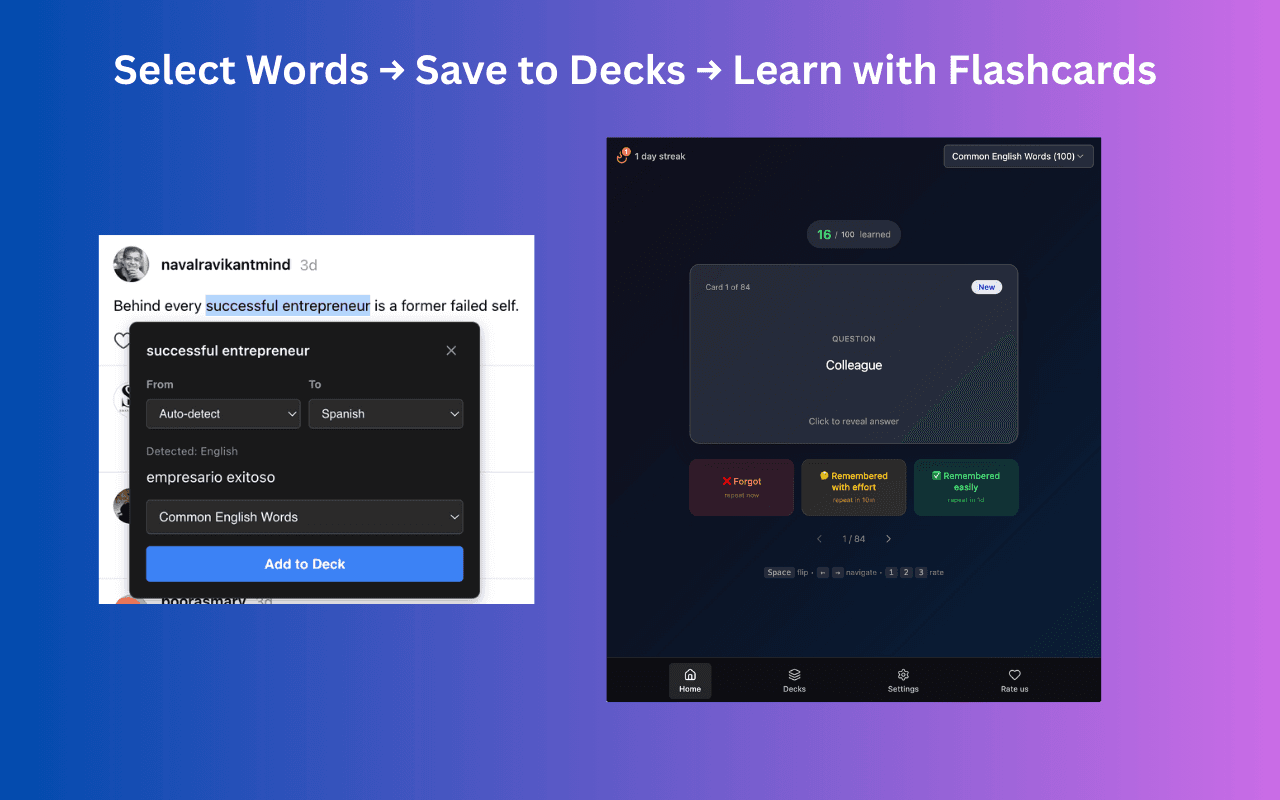
The side panel shows a flashcard whenever you open it. Your browsing habit becomes your study habit.
Science-Backed Spaced Repetition
Rate cards as Forgot, Hard, or Easy. The algorithm optimizes your review schedule automatically.
Beautiful Study Environment
Stunning wallpapers that rotate daily. A distraction-free interface that inspires focus.
Create Custom Decks
Build unlimited flashcard decks for any subject—languages, medicine, coding, history.
Predefined Vocabulary Packs
Start immediately with curated decks: Top 100 English Words, Kazakh vocabulary, and more.
Google Sheets Import
Already have flashcards? Import directly from Google Sheets with one click.
Keyboard Shortcuts
Power users rejoice: Space to flip, arrows to navigate, 1-2-3 to rate cards.
Progress Tracking
Visual counters show learned vs. remaining cards. Celebrate your daily streaks.
How It Works
Start Learning in 10 Seconds
No complex setup. No account required. Just install and start learning.
Install in One Click
Add Flashcard Maker from the Chrome Web Store. No account needed, no configuration required.
Choose or Create Decks
Start with predefined vocabulary packs or create your own custom decks for any subject.
Learn Passively
Open the side panel whenever you want. Each time shows a flashcard. Rate your recall and watch your knowledge grow.
Testimonials
Loved by Learners
Join thousands of students, professionals, and lifelong learners who've made flashcards a habit.
Language Learners
5,000+ users
Medical Students
2,000+ users
Developers
1,500+ users
Business Pros
1,000+ users
“I've tried Anki, Quizlet, and every flashcard app out there. This is the first one that actually stuck because I don't have to remember to open it.”
Maria K.
Medical Student
“Learning Japanese vocabulary has never been easier. I review 50+ words daily without even trying. The spaced repetition really works!”
James T.
Language Learner
“As a developer, I use this to memorize keyboard shortcuts, CLI commands, and API patterns. It's surprisingly effective for technical knowledge.”
Alex R.
Software Engineer
“The beautiful design makes the side panel a joy to use. I actually look forward to seeing what card comes up next!”
Sophie L.
Design Student
2.5M+
Cards Reviewed Monthly
85%
Retention Rate
15 min
Avg. Daily Learning
See It in Action
A Beautiful Learning Experience
Clean design meets powerful functionality. Every detail crafted for focused learning.
FAQ
Frequently Asked Questions
Everything you need to know about Flashcard Maker.
Simply install Flashcard Maker from the Chrome Web Store. No account required, no configuration needed. Start learning immediately with predefined decks or create your own custom flashcard decks.
Spaced repetition is a learning technique that shows you flashcards at optimal intervals based on how well you remember them. Cards you find difficult appear more frequently, while cards you know well appear less often. This maximizes learning efficiency and long-term retention.
Yes! You can create custom decks manually within the extension, or import flashcards directly from Google Sheets. This makes it easy to use your existing vocabulary lists or share decks with others.
Yes, Flashcard Maker works completely offline. All your flashcard data is stored locally in your browser. The only online feature is the daily wallpaper, which caches for offline use.
Absolutely. All your data is stored locally in your browser and never sent to any servers. We don't collect, track, or share any personal information. Your learning journey is completely private.
While Anki is a powerful desktop application, Flashcard Maker integrates learning directly into your browser. The side panel gives you a learning opportunity whenever you need it. There's no need to open a separate app—learning becomes part of your natural browsing habit.
Start Learning in 10 Seconds
No account required. No credit card. No configuration. Just install and transform the side panel into a learning opportunity.